For personal-injury firms

Get up to speed on a case in minutes.

Corro reads your case file once, from Clio or a zip, and shows your team what matters, each date, figure and statement linked to its page. Treating providers get a page you control.

Try Corro on a sample case first. Your own cases start with a 30-day money-back guarantee.

A fictional case. The real product, recorded from the screen. About two minutes
What the video shows
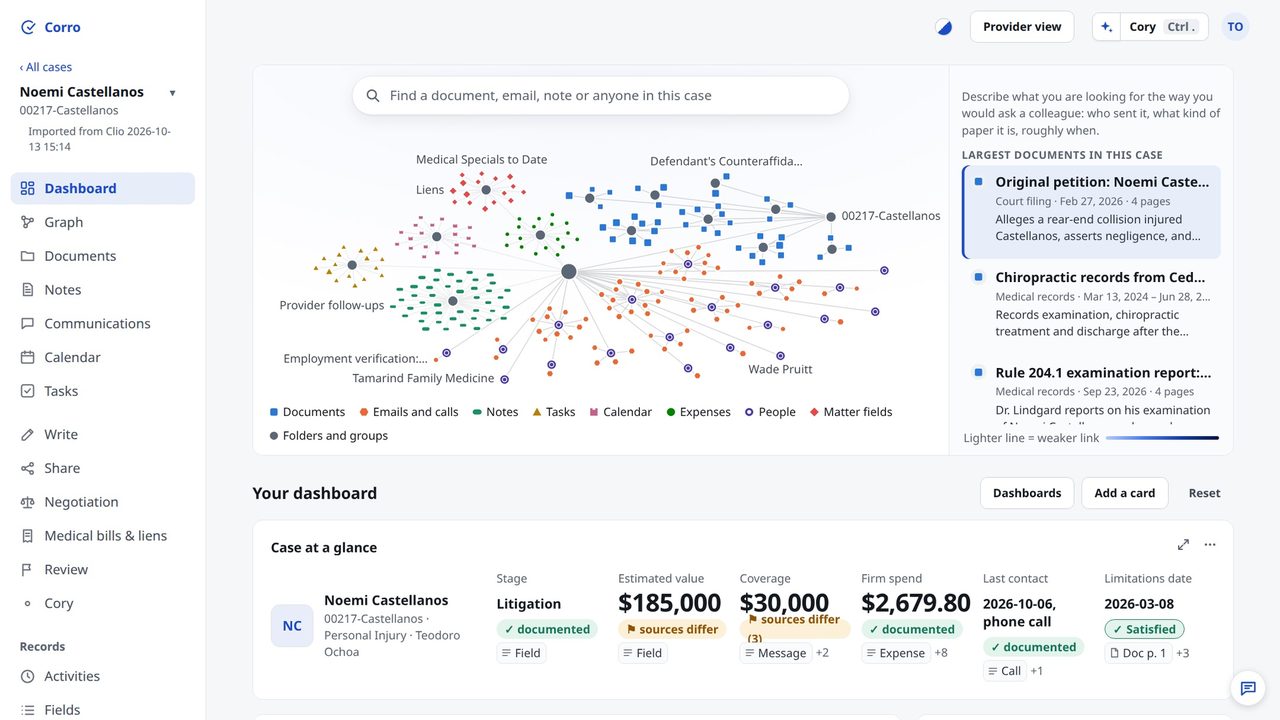
  1. One look at a case: its value, its coverage, and who last spoke to the client.
  2. Since the case was last opened, this changed.
  3. A deadline turns green only when the file shows it was met.
  4. And the money reads in settlement order: the gross, the fee, the costs, each lien and balance, the client's net.
  5. Describe the document you need, in your own words.
  6. Corro finds it, lights it on the map, and opens the page, matches marked.
  7. Write to the adjuster: Corro marks what the file leaves open, and what it never addresses.
  8. And it holds back the client's settlement position from the other side.
  9. Before the call, ask Cory to prep you.
  10. Its brief cites the file, sentence by sentence.
  11. On the call, with everyone's consent, Corro listens and checks what is said against the file, live.
  12. Providers treating your client see only what you allow: status, their bills and records.
  13. One link by email: their page shows what the firm needs, their bills, and how the case moves.
  14. Your cases are on your phone too: today across them, and each case's dashboard.
  15. Tell us what to improve.
  16. Corro. Bring your cases from Clio or as a zip, at corro.live.
What Corro does

One case file, read once, laid out for everyone who works on it.

  • Up to speed in minutes

    Open a case and see what matters first: the firm's estimate of its value and the coverage behind it, what to do next, what is overdue and what is waiting on someone else.

  • Every statement sourced. Contradictions flagged.

    Each date, amount and finding carries its source (the note, email or page) and the quote. Click it and the page opens. Quotes are matched against the source by code; any that cannot be matched are marked for you to check.

  • Providers kept informed

    Give each treating provider a private link with the case status, their own bills and records, and what you need from their office. You choose what they see, and you can see when they opened it.

How it works

Three steps, and nothing to re-type.

  1. Connect Clio or upload the file

    Sign in to Clio once and pick a matter, or upload the case: a zip of the folder, or files in any common format, from PDFs, scans and photos to Word, spreadsheets and email with its attachments. Corro only reads from Clio. It never writes to it.

  2. Corro reads it once

    Notes, emails, records and bills, scanned pages included, are read once by OpenAI's models and kept for your firm. Each page counts once against your monthly pages (Clio notes and emails at 3,000 characters a page); reading it again later is free, and a changed file or record counts as new.

  3. Work from one view

    Your team opens the case, checks drafts against the file and asks Cory. Each treating provider gets a link of their own.

The checker

Check a sentence against the file before it goes out.

Type or paste what you are about to send: a line of a demand letter, or your notes of a call with a provider's office. With everyone's consent, Write can also transcribe the call as you talk. Corro compares each statement with the file and shows the record that supports or contradicts it.

  • Five verdicts: supported, contradicted, out of date, not in the file, and don't send, for wording that should not leave the firm.
  • Amounts and dates are matched by code. Where a model is needed it only picks the verdict; the quote and the page always come from the file.
  • It tells you what the file says, not what is true. The judgment stays yours.
The graph

See the whole file, and how it connects.

Every document, note, email and record is a point on one map, linked to the statements it holds. Search once and every hit lights up, so you can see where a statement is backed by several records and where it rests on one.

  • Find: a card for every document and record, with results as you type, in one case or across every case in your firm that you can open.
  • In a test on 2026-10-13 on one sample case (a few dozen documents among a couple of hundred notes, emails and other records), Find put the document being looked for in its top two results for 21 of 24 searches, written without seeing Find's results and never used for tuning.
  • Open any point to read the record behind it.
  • Drop a new file on the map to add it to the case, in any common format. It is kept in Corro, never sent to Clio.
Cory

Ask Cory about the card in front of you.

Bring any card, figure, task list or document into Cory and ask what you want to know about it. Answers come from the file: each sentence cites the record it rests on, code checks that the record is about the same thing and that every figure and date in the sentence is in it, and a sentence that fails is marked.

  • Before a call, ask Cory. It answers in a headline and a few short points, each with its source: the last contact and what was said, what is waiting on whom, the next dated event and the figures in the file. What is outstanding and what providers have billed are counted in code.
  • Open any citation to read the page behind it.
  • Cory drafts from the file too, such as a medical chronology with every entry linked to its page.
  • Cory only reads. It changes nothing in the case and nothing in Clio.
  • Cory reports what the file records. It is built not to suggest what a client or a witness should say, and not to recommend a settlement figure, and every answer is checked for both: whether to settle is the client's decision.
Money

The closing statement, added up from the file.

Every case gets a closing statement in settlement-statement order, from gross through fee, costs, liens and providers' balances to the net to client. Each line is added up in code from Clio's own entries and opens its source.

  • When a provider's balance is not in the file, the figure says "Net before unknown balances" instead of guessing.
  • The specials schedule a paralegal builds by hand: dates of service, billed, paid by payer, adjustments and balance for each treating provider, with payments for the whole claim shown by payer, never split by guesswork.
  • Coverage typed layer by layer: only the at-fault party's liability limit, and any excess or umbrella policy the file shows, set the ceiling; the client's own UM/UIM and no-fault are shown apart, never added to it.
  • Whether to settle, and for how much, stays the client's decision. Corro computes the gross below which the client nets nothing; your figures are yours.
For treating providers

Keep providers informed without the phone calls.

A doctor treating on a lien wants to know whether the case is moving and what you need from their office. Give each provider a private page with what you choose to send, and send an update when the case moves.

  • You choose what each provider sees, category by category, and preview exactly what will leave the firm.
  • Strategy, valuation and internal notes are not categories you can share. What you write to a provider is checked before it goes out, and held if it touches them.
  • Send emails the link to the office for you, and later updates go at most once every 12 hours. Each send is a snapshot on a link that works for 90 days after your latest send, and a log shows who sent what, where, and when the link was opened.
  • Each provider sees their own account with the case: billed, paid by payer, adjustments and balance, and what you need from their office, with dates.
  • Providers can ask a question or reply on the same page. Nothing reaches them that you did not approve.
How it works for providers
Security and data handling

What happens to your files, stated plainly.

  • Read-only in Clio

    Corro's connection to Clio sends read requests only. Our code refuses any other kind of request before it leaves the server.

  • Each firm kept apart

    Every firm's cases, documents and page images live in a folder and database of their own, on Google Cloud in Oregon, encrypted at rest, with daily backups kept for 7 days.

  • Read by OpenAI's models

    Documents, and what you ask Cory or check with the checker, are sent to OpenAI's API with storage turned off. OpenAI says API data is not used to train its models unless the customer opts in, and we have not; it may keep abuse-monitoring logs for up to 30 days.

  • No claims we can't back

    Corro has no SOC 2 report, does not claim HIPAA compliance and has not signed a business associate agreement. When that changes, the security page will say so.

Read the security page AI and your professional duties

One plan, priced per user, per month.

Everyone in your firm gets the whole product. Explore the sample case first; a card is asked for only when your firm subscribes.

$49.99per user per month

  • Includes 1,000 pages read (documents, plus Clio notes and emails at 3,000 characters a page) per user each month, shared across your firm.
  • Need more? Add 1,000 pages for $50 or 10,000 pages for $350, prepaid, only when you choose; never charged automatically.
  • Cory and the checker included, within a fair-use allowance per user each month; past it, Cory pauses and the checker keeps running its code-only checks.

30-day money-back guarantee on your subscription. Within 30 days of your first payment, your firm's owner can get back everything you have paid for your subscription, from the Billing page, once per firm; the subscription ends at once.

Extra page packs are not covered.

Questions

What lawyers ask us first.

Does Corro change anything in Clio?

No. Corro reads your matters through Clio's API and never writes back. It sends read requests only, and our code refuses any other kind before it leaves the server. Clio stays your system of record.

What does Corro read?

What Clio holds for the matter: contacts, custom fields, notes, logged emails and calls, tasks, calendar entries, expenses and bills, and the documents themselves. Scanned pages with no text layer are read from the page image, and made searchable word for word by text-recognition software on our own server. Files you upload are read the same way.

We don't keep everything in Clio. Can we still use it?

Yes. Upload a zip of the case folder, or files one by one: PDFs and scans, photos, Word documents, spreadsheets, presentations, and email with its attachments. Scanned pages become searchable word for word. Audio and video are transcribed when you choose, so a recording becomes searchable word for word, and the recording itself is kept and plays in Corro. Files you add are kept in your firm's own store in Corro and never sent to Clio.

How long does it take to read a case?

In two measured runs on our sample case (a few hundred pages), the first full read took 7 and 13 minutes; larger files take longer. After that, only new or changed items are read again.

Can we rely on what Corro shows?

Check it as you would a careful paralegal's summary, and you don't have to take it on trust: every statement links to its page and quote, quotes are matched against the source by code, and anything that cannot be matched is marked for you to check. Corro reports what the file says, not what is true; the legal judgment is yours. For how this fits your duties under the ABA's guidance on AI, see AI and your professional duties.

Is client information used to train AI models?

Not by us. OpenAI states that data sent to its API is not used to train its models unless the customer opts in, and we have not opted in. Requests may be kept in OpenAI's abuse-monitoring logs for up to 30 days, and flagged content longer. Details are on the security page.

Do providers need an account?

No. Each provider gets a private link from your firm. It shows only what you allowed, and you can turn it off at any time. Providers are never charged.

Open the sample case and see what Corro finds.

No card needed. A short guided tour shows you three things to try, on a sample personal-injury case.